Best adapters
Wi-Fi OBD2 adapter · iPhone & Android · 12V cars

Generic ELM327 Wi-Fi Adapter

The generic ELM327 Wi-Fi adapter is the no-frills way to read a check-engine code on a phone. It broadcasts its own small Wi-Fi network, so iPhones and Android phones can both use it with apps like Car Scanner and Torque.

  • ConnectionWi-Fi only, no Bluetooth
  • PhonesiPhone, iPad, Android phones and tablets
  • Suggested appsTorque on Android; Car Scanner, OBD Mate on iPhone
  • Vehicles12V petrol and diesel OBD2 cars
  • Not supportedFORScan, Ford-family programming, motorcycles
  • Size3.5 x 1.8 x 1 in
Works well for
  • iPhone owners who want a cheap code reader for the glovebox
  • Checking a warning light at the roadside before driving on
  • Watching live sensor data on a phone or tablet
  • Owners of older iPads or phones that run Wi-Fi OBD apps
Avoid if
  • Ford, Lincoln, Mercury and Mazda owners who want FORScan
  • Drivers who run navigation or music while scanning
  • Leaving plugged in on a car that sits for weeks
Check it out
Listings

Ways to order it

The check-engine light comes on mid-trip and your iPhone is all you have

A warning lamp on the highway raises one question: can I keep driving? A Wi-Fi ELM327 in the glovebox answers it in a couple of minutes. Pull over, plug it in, and the phone shows the trouble code and what the car was doing when it was stored.

That is the job this adapter does well. It reads and clears codes, shows live sensor data and lets you judge whether a fault is a loose fuel cap or something that needs a tow. Keeping an eye on the sensors also helps you spot habits that are hard on the car.

Wi-Fi is the reason iPhones can use it at all. Apple does not let ordinary apps talk to Classic Bluetooth adapters, so cheap Bluetooth ELM327s never show up on an iPhone. A Wi-Fi adapter sidesteps that by acting as a tiny network the phone can join.

  • iPhone and iPad: Car Scanner and OBD Mate are suggested, and any app that offers a Wi-Fi connection should work.
  • Android: Torque is the usual pick, and Google Play carries more free OBD apps than the iOS App Store.
  • Vehicles: 12V petrol and diesel cars with a standard OBD2 port, which covers most cars and light trucks from 1996 in the US.

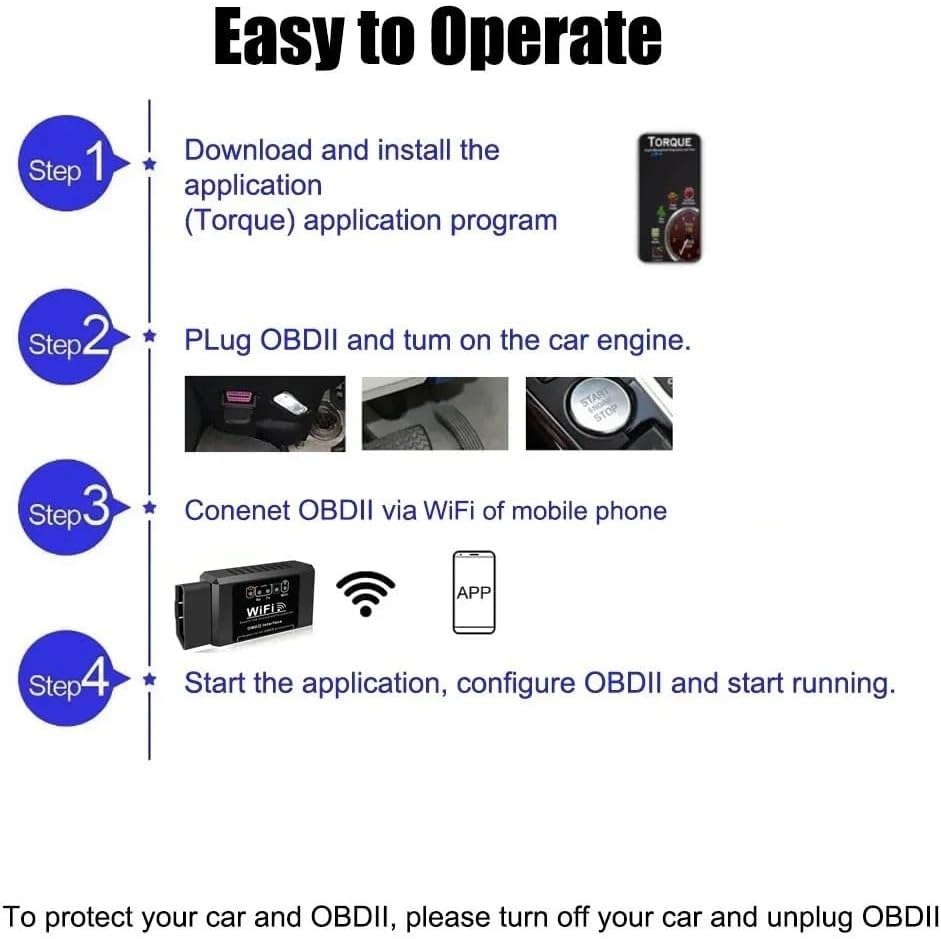
It needs no laptop and no cables. The adapter is small and light, so it lives in a door pocket until a light appears. The ELM327 app guide lists free and paid apps for both phones, and the step-by-step connection guide walks through a first scan.

Details

Technical details

SpecValue
Brand (lead model)ULTRAOBD
ModelWIFI OBD
Link typeWi-Fi only
BluetoothNo
iPhone / iPadYes, with Wi-Fi OBD apps
AndroidYes
Suggested appsTorque (Android); Car Scanner, OBD Mate (iPhone)
FunctionsRead and clear trouble codes, live sensor data
Vehicles12V petrol and diesel OBD2 vehicles
FORScanNot supported
Ford-family programmingNot supported
MotorcyclesNot supported
Laptop neededNo; phone or tablet
PowerCar's OBD port
Dimensions3.5 x 1.8 x 1 in

Joining WiFi_OBDII and typing the address into the app

The first connection takes a few minutes; after that the phone remembers it. Most generic adapters broadcast a network with a name like WiFi_OBDII, with no password. The card in the box gives the exact name and address for your unit, so keep it handy.

  1. Plug the adapter into the OBD2 port under the dashboard and switch the ignition on.
  2. On the phone, open Wi-Fi settings and join the adapter's network.
  3. If the phone gets no address, set the IP manually. A common pairing is 192.168.0.11 for the phone with subnet 255.255.255.0, leaving the router field empty.
  4. Open the OBD app, choose Wi-Fi as the connection type, and enter the adapter's address and port. Many generic units use 192.168.0.10 and port 35000.
  5. Connect and let the app detect the car's protocol.

Those numbers are typical, not universal. If the app cannot connect, check the card, or use an app that scans the network to find the adapter. Once one setup works, write the numbers inside the manual cover.

Security note: the adapter's network is usually open. Anyone nearby with an OBD app could connect while it is plugged in, so unplug it when you are done, especially on the street.

The versions vary in small ways. Some carry a v1.5 label and others v2.1 on a PIC18F25K80 board; the number printed on a clone says little about quality, and the v1.5 versus v2.1 comparison explains why. The iCar2- and iCar3-style versions borrow Vgate's names but are not Vgate products.

Across the range

Compared with the field

ELM327 OBD2 adapter models by type, September 2026. Highlighted: Generic ELM327 Wi-Fi adapter.

Maps go quiet while it's connected: living with no internet on the phone

Every Wi-Fi adapter shares one catch. Once the phone joins the adapter's network, it may try to send all its traffic that way, and that network leads nowhere but the car. Navigation, streaming and messages can stall while the OBD app is open.

Phones handle this differently, and the fixes work with varying success:

  • Leave the router field blank in the manual IP setup; many phones then keep mobile data for the internet.
  • On Android, accept the prompt to stay connected when it warns the network has no internet.
  • On iPhone, expect a no-internet warning and choose to stay on the network.
  • Disconnect when finished, so the phone falls back to mobile data or your home Wi-Fi.

Wireless CarPlay and wireless Android Auto add a second clash. They use the phone's Wi-Fi to reach the car's screen, so on many cars the phone cannot hold the head unit and a Wi-Fi OBD adapter at the same time. Wired CarPlay avoids the conflict.

Parked at the roadside reading a code, none of this matters much. It becomes a real nuisance if you want live gauges on a long drive with navigation running. In that case a Bluetooth LE adapter is the better tool, because it leaves the phone's Wi-Fi alone.

Battery use is the other trade-off. Wi-Fi radios draw more power than Bluetooth LE when idle, and a generic unit may have no sleep mode at all. Unplug it after each use on a car that sits. The Wi-Fi adapter guide goes deeper on both problems.

Other picks

Three alternatives

1 Vgate iCar Pro Wi-Fi
Branded Wi-Fi with sleep mode Vgate iCar Pro Wi-Fi
Vgate iCar Pro Wi-Fi saves battery, takes firmware upgrades and works with iPhone and Android apps.
  • Wi-Fi connection
  • Works with iPhone, Android
Check it out
2 Veepeak OBDCheck BLE
iPhone without the Wi-Fi fuss Veepeak OBDCheck BLE
Veepeak OBDCheck BLE connects from inside the app, so the phone keeps its internet.
  • Bluetooth LE connection
  • Works with iPhone, Android
  • BMW / BimmerCode ready
Check it out
3 Vgate iCar Pro BLE 4.0
Vgate Bluetooth LE option Vgate iCar Pro BLE 4.0
Vgate iCar Pro BLE 4.0 sleeps at about 3 mA and connects to iPhone and Android without a network.
  • Bluetooth LE connection
  • Works with iPhone, Android
Check it out

No FORScan, no motorcycles, no Bluetooth: what the Wi-Fi clone skips

The lead model is unusually clear about what it will not do, and it repeats it in capitals. It is Wi-Fi only, it does not support Bluetooth, it does not support FORScan, and it is not for motorcycles. It also cannot program Ford, Lincoln, Mercury or Mazda cars.

Those limits shape who should buy it. For generic codes and live data on a phone, it is the cheapest route onto an iPhone. For anything that writes to the car, it is the wrong tool.

Diesel owners get the same generic functions as petrol owners, provided the vehicle runs on 12V. Heavy trucks on 24V systems are outside its range, and so are cars older than the OBD2 standard. Electric and hybrid cars answer generic requests to varying degrees, depending on the maker and the app you use.

Your planGeneric Wi-FiBetter fit
Read a check-engine code on an iPhoneYes—
Live data with navigation runningAwkwardVeepeak OBDCheck BLE
FORScan on a FordNovLinker FS USB
Leave plugged in with sleep modeNot statedVgate iCar Pro Wi-Fi
BMW codingNoA BimmerCode-certified Bluetooth adapter

Three things to settle at home first:

  1. Check your app supports Wi-Fi adapters; most generic OBD apps do.
  2. Decide whether losing mobile data while scanning bothers you.
  3. Plan to unplug it after each use, since no sleep mode is stated.

If you like the Wi-Fi approach but want a branded unit with firmware updates and battery saving, Vgate's iCar Pro Wi-Fi is the step up. If you only need an iPhone to see the car, a BLE adapter does it with less fuss.

Driver questions

Compatibility questions

Does the generic Wi-Fi ELM327 work with an iPhone?

Yes. The phone joins the adapter's Wi-Fi network and apps like Car Scanner and OBD Mate connect over it.

What IP address and port does it use?

Many generic units use 192.168.0.10 and port 35000, but check the card in the box, as defaults vary.

Why does my phone lose internet when it is connected?

The phone may route traffic through the adapter's network, which has no internet. Leaving the router field blank or accepting the stay-connected prompt often helps.

Does it work with FORScan?

No. The maker states it does not support FORScan or Ford-family programming.

Does it work on motorcycles?

No. It is not supported on motorcycles.