Best adapters
Switched USB cable · Ford, Lincoln, Mercury, Mazda · Windows

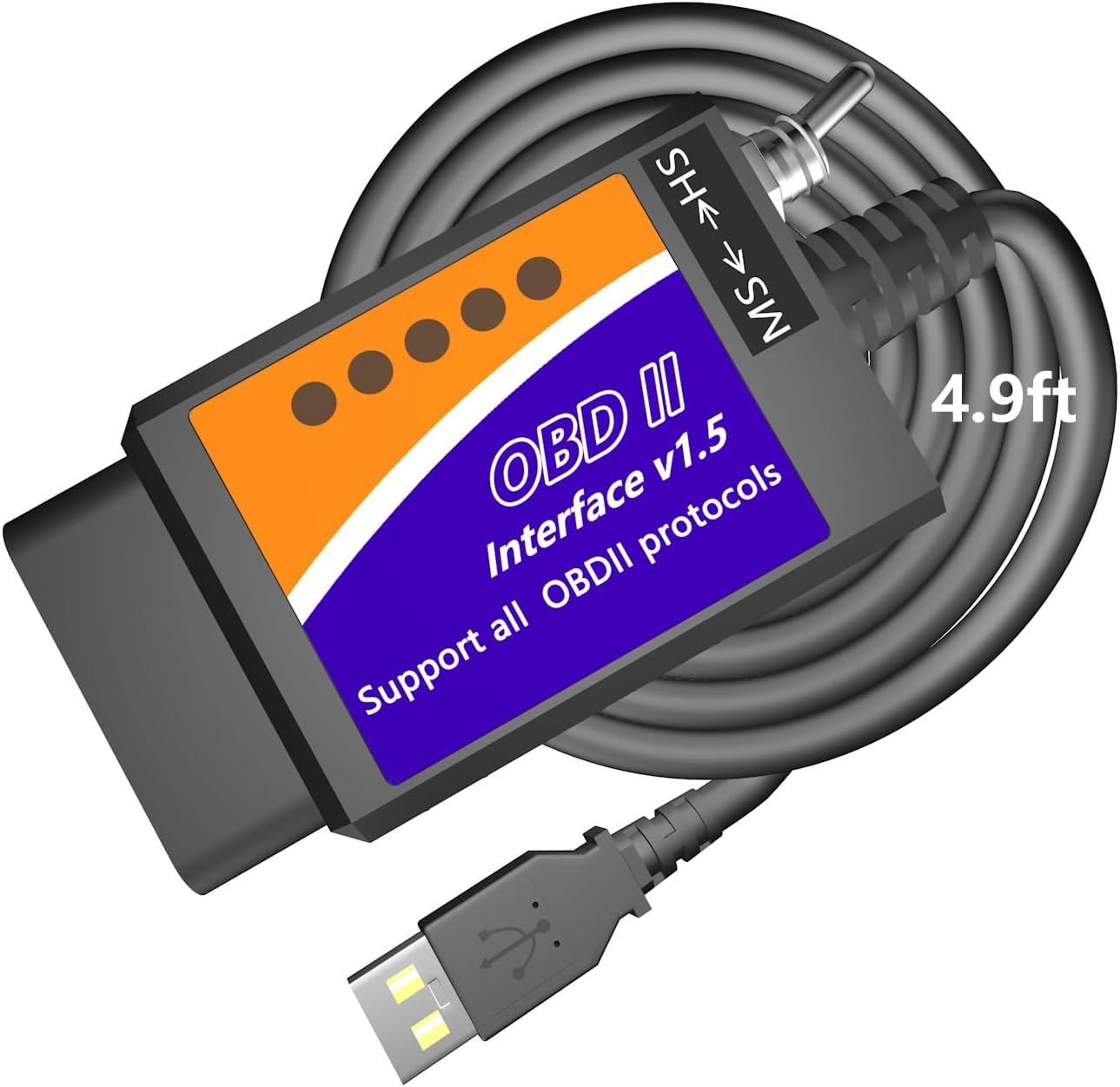
Generic ELM327 USB FORScan Cable

The classic budget route into Ford module settings: a v1.5 ELM327 USB cable with a manual HS-CAN/MS-CAN toggle, a CH340-type USB chip on most builds and Windows software such as FORScan, ELMconfig and FoCCCus.

  • ConnectionUSB to Windows XP through 10, 32/64-bit
  • Ford busesManual HS-CAN / MS-CAN toggle
  • HardwareELM327 v1.5 type
  • USB chipCH340T on the lead model; FTDI on some versions
  • SoftwareFORScan, ELMconfig, FoCCCus, FF2, ScanMaster
  • Weight100 g
Works well for
  • Ford, Lincoln, Mercury and Mazda owners making a few comfort changes
  • Reading and clearing codes on a laptop, including MS-CAN modules
  • Owners who want a spare cable in the garage drawer
  • A first try at FORScan before buying a premium adapter
Avoid if
  • Phones and tablets: it is a Windows USB cable
  • Module programming where the fastest, steadiest link matters
  • Trailers and semi-trailers
Check it out
Listings

Ways to order it

A Ford, a Windows laptop and a two-position toggle on the cable

Plug a plain ELM327 into a Ford and it reads engine codes happily, then goes quiet when you ask for the instrument cluster or the radio. Those modules sit on a second network, medium-speed CAN, on different pins of the port. The small toggle on this cable moves the connection across so the same chip can reach them.

That one switch is what turns an ordinary USB ELM327 into a Ford tool. With FORScan or ELMconfig open on a Windows laptop, you can read and clear codes in every module, watch live data and change settings the car already supports.

The lead model names a long wish list of changes owners make, provided the car has the matching modules:

  • Global window opening and closing from the key fob.
  • Bambi mode, which shows more information on the cluster.
  • Secure idle, perpendicular parking and the trailer brake controller, where fitted.
  • No double horn chirp and no door-ajar chime.
  • Mirrors that tilt down in reverse, and tire size correction after new wheels.

Coverage runs across Ford, Lincoln, Mercury and Mazda from 1996, and the cable works as a normal OBD2 reader on other cars. The protocol list includes the older J1850 PWM used by late-1990s Fords as well as HS-CAN, MS-CAN, HS-CAN2 and HS-CAN3.

Treat the switch position as part of the job. Leave it on HS for everyday scanning and move it only when FORScan asks, or MS-CAN modules will seem to vanish. The FORScan guide explains which modules live on which bus.

Details

Technical details

SpecValue
Brand (lead model)OBDResource
ModelFORD327
Link typeUSB, wired
HardwareELM327 v1.5 type
USB-serial chipCH340T (lead model); FT232RL FTDI on some versions
DriverCH340T USB driver, installed before first use
Bus switchManual HS-CAN / MS-CAN toggle
ProtocolsAll OBD2 protocols, plus J1850 PWM, HS-CAN, MS-CAN, HS-CAN2, HS-CAN3
ComputerWindows XP, Vista, 7, 8, 10; 32- and 64-bit
iPhone / AndroidNo
SoftwareFORScan, ELMconfig, FF2, FoCCCus, ScanMaster
VehiclesFord, Lincoln, Mercury, Mazda from 1996; generic OBD2 on other cars
Named Ford modelsF-150 to F-450, Ranger, Transit, Mustang, Explorer, Edge, Fusion, C-Max, S-Max, Kuga, Mondeo
Not forTrailers and semi-trailers
Weight100 g

CH340 or FTDI inside the plug: telling the cheap cables apart

These cables come from many workshops under many names, and they are not identical. The part that differs most is the USB-to-serial chip, which makes the cable look like a COM port to Windows. The lead OBDResource cable uses a CH340T; a few versions, such as the AntiBreak build, name an FTDI chip instead.

PointCH340-type cableFTDI FT232RL cable
DriverCH340 package from WCHFTDI VCP driver
Windows nameUSB-SERIAL CH340USB Serial Port
Latency tuningNot usually exposedAdjustable in port settings
Counterfeit riskLowCopies of the FT232 exist

Both chips read codes and write configuration well. FTDI cables let you lower the port's latency timer, which some FORScan users prefer for snappier replies. CH340 cables cost less and work fine for the occasional tweak.

The versions differ in other ways too. Most carry the HS/MS-CAN toggle. A handful, such as the FT232RL cable with a PIC18F25K80 v1.4 board and the plain CERRXIAN lead, do not name a switch at all, which makes them general OBD2 cables rather than Ford tools. The VINTscan VINT-TT55502 is a separate Windows design sold under its own name.

  • For Ford comfort settings, pick a version that names the HS/MS-CAN switch.
  • For FTDI latency tuning, pick one that names the FTDI chip.
  • For generic engine codes only, any version works.

The v1.5 versus v2.1 comparison explains why a v1.5 label is the one Ford owners look for.

Across the range

Compared with the field

ELM327 OBD2 adapter models by type, September 2026. Highlighted: Generic ELM327 USB FORScan cable.

Windows shows an unknown device: installing the CH340T driver

The maker says it plainly: this is a professional tool, not plug-and-play, and the driver goes on before the cable goes in. A new cable that seems dead is almost always a missing driver. Sort it out at the desk, because the laptop side works without the car connected.

  1. Download the CH340 driver from WCH, the chip's maker, or the FTDI VCP driver for FTDI versions. Skip driver discs and random download sites.
  2. Install it, then plug the cable into the laptop.
  3. Open Device Manager and look under Ports (COM & LPT) for USB-SERIAL CH340 or USB Serial Port, with a COM number beside it.
  4. Note the COM number, then install FORScan, ELMconfig or FoCCCus.
  5. At the car, set the toggle to HS, switch the ignition on and connect from the software.

If the port shows a yellow warning triangle, remove the device, reinstall the driver and replug. Newer Windows versions insist on signed drivers, which the chip makers supply.

Mac and ARM laptops: the cable itself works on a Mac, but FORScan and ELMconfig are Windows programs. Windows on ARM is the only virtual option on Apple silicon, and budget cable drivers may not support it, so an older x86 Windows laptop is the easy answer.

Most clone ELM327 cables talk at 38,400 baud, and the software usually finds that on its own. You can test the link by hand with a few AT commands from a terminal; the ELM327 commands page lists the useful ones. The USB guide covers the driver story in more depth.

Other picks

Three alternatives

1 Vgate vLinker FS USB
No toggle to forget Vgate vLinker FS USB
Vgate vLinker FS USB switches HS/MS-CAN automatically and supports about 18V programming on select older US models.
  • USB cable for laptops
  • Works with Windows
  • FORScan-ready (HS/MS-CAN)
Check it out
2 OBDLink EX
For module programming OBDLink EX
OBDLink EX reaches every Ford CAN bus at once and is the FORScan team's recommended adapter.
  • USB cable for laptops
  • Works with Windows
  • FORScan-ready (HS/MS-CAN)
Check it out
3 MOCATEC USB FORScan Adapter
Toggle cable, longer reach MOCATEC USB FORScan Adapter
MOCATEC's switched cable has a 4.9 ft lead, so the laptop can sit on the passenger seat.
  • USB cable for laptops
  • Works with Windows
  • FORScan-ready (HS/MS-CAN)
Check it out

When a budget toggle cable is enough, and when to spend more

A switched generic cable reaches the same modules as adapters costing several times more. What it gives up is convenience, speed and the steadiness that matters on long writes. For a few settings changed once, that trade is often fine.

AdapterSwitchingBest for
Generic switched cableManual toggleA few comfort settings, occasional codes
MOCATEC USBManual toggle, 4.9 ft leadToggle cable with room to sit comfortably
Vgate vLinker FS USBAutomatic HS/MSRegular FORScan use, 18V programming support
OBDLink EXElectronic, all buses at onceModule programming and advanced FORScan functions

Spend more when you plan to reprogram modules, run long service procedures or configure several family cars. The automatic and electronic adapters remove the switch step and move data faster, which shortens every session.

  • Check that the version you choose names the HS/MS-CAN switch.
  • Check your laptop runs x86 Windows, not a Mac or an ARM tablet.
  • Confirm your model and the feature you want in FORScan before ordering.

Before any write, connect a battery maintainer and save the original configuration of every module you touch. Whatever cable you use, write down each value next to the one you changed.

A cheap cable also makes a sensible spare. Plenty of owners keep one in the glovebox or garage drawer for reading codes on a road trip, and save the premium adapter for configuration evenings. If the budget cable ever fails at the strain relief, it costs little to replace, and nothing you configured with it is lost, because the settings live in the car's modules.

Driver questions

Compatibility questions

Does this cable work with FORScan?

Versions with the HS/MS-CAN switch work with FORScan on Windows, alongside ELMconfig, FoCCCus and FF2. Versions that name no switch reach only the high-speed bus.

Which driver does it need?

The lead model uses a CH340T chip and needs the CH340 driver from WCH. FTDI versions use the FTDI VCP driver.

Which way should the switch sit?

On HS for normal scanning. Move it to MS only when FORScan prompts you.

Can I use it with a phone?

No. It is a USB cable for Windows laptops. Phones need a Bluetooth or Wi-Fi adapter.

Does it work on non-Ford cars?

Yes, as a normal OBD2 code reader on 1996-or-newer cars, but the Ford-specific features need Ford software.